
What is a Modal?
A modal is a dialog that is displayed on top of everything and gives the user actions and information.
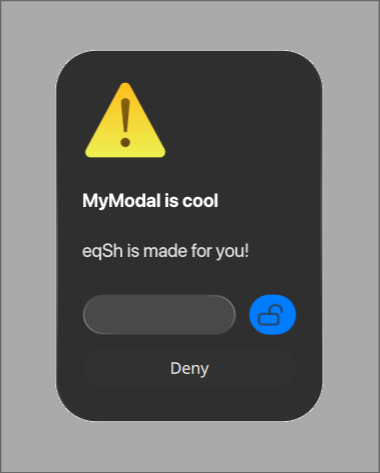
How to create a Modal
You can easily create a modal using the equora ipc modal instance command.
instance( appName, title, description, actionsJsonPath, iconPath, useIcon )
Example:
$ equora ipc modal instance "Name" "Title" "Description" "path/to/your/actions.json" "icon.png" true
If you make the iconPath empty, then it will use the default icon. (See image above)
Actions
You can make actions for your modal inside the actions.json file.
It is a list of columns and rows.
to create a column, you can use an array of actions.
[ // column
    [ // row
        { // action
        }
    ]
]
Lets take a look at an action:
{
    "type": "button",
    "primary": true,
    "width": 30,
    "iconPath": "/home/enviction/MacTahoe-icon-theme/src/actions/symbolic/object-unlocked-symbolic.svg",
    "label": "",
    "fillWidth": false
}
This action is of type button, and it is the primary action, which makes it use the accent color. It has a width of 30px, leaving this empty will make it autosize. It has an icon, using iconPath for the path to the icon, and a label of an empty string. It also doesn't fill the width of the row.
Lets look at another one
{
    "type": "button",
    "label": "Deny"
}
This is a very simple button, with a label of "Deny". Since this does not set any width or fillWidth, it will fill up the entire row.
Theres of course not only buttons, but also inputs.
{
    "type": "input",
    "variable": "title",
    "inputType": "password",
    "placeholder": "",
    "command": "notify-send '$title' 'Yay'"
}
This is an input, with a variable of "title", an inputType of "password", a placeholder of an empty string, and a command of "notify-send '$title' 'Yay'".
The command is executed when the user presses enter.
But what if you wanted to make the button also run the command?
To do that give the input an id, lets say inputAction
Then give the button an callbackRedirect with the inputAction id.
{
    "type": "input",
    "variable": "title",
    "inputType": "password",
    "placeholder": "",
    "command": "notify-send '$title' 'Yay'",
    "id": "inputAction"
},
{
    "type": "button",
    "primary": true,
    "label": "Submit",
    "callbackRedirect": "inputAction"
}
Now when pressing the button, the command of the input will be executed.
Example file
actions.json
[
    [
        {
            "id": "input",
            "type": "input",
            "variable": "title",
            "inputType": "password",
            "placeholder": "",
            "command": "equora ipc popup openPopup '' 'MyModal' 'This is a Title' '$title' 200 'banner'"
        },
        {
            "type": "button",
            "primary": true,
            "width": 50,
            "iconPath": "",
            "label": "Send",
            "callbackRedirect": "input",
            "fillWidth": false
        }
    ],
    [
        {
            "type": "button",
            "label": "Deny"
        }
    ]
]